"One of the my favorite project, finished with the help of 3ds max, Unreal & D5 "
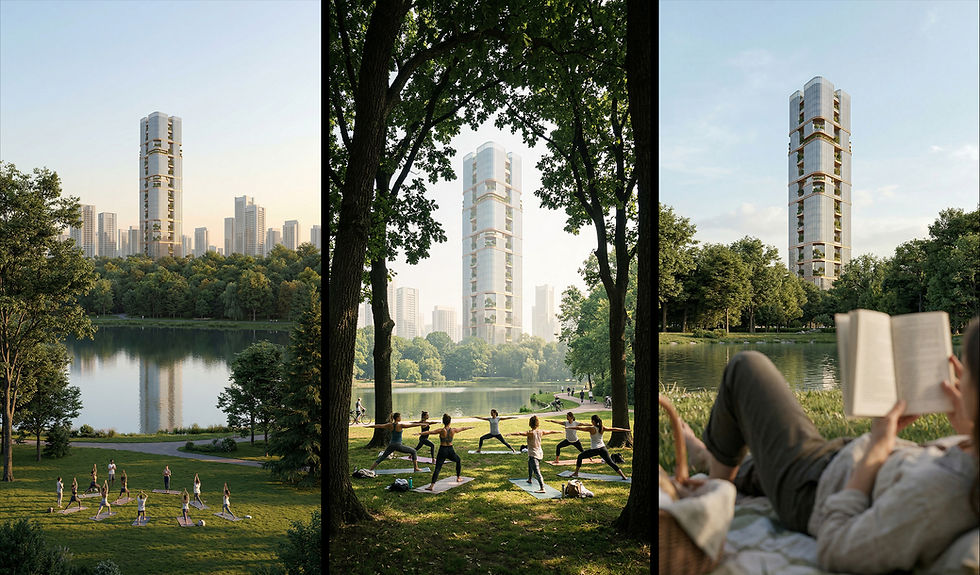
Your FreeWorkflow is here
Tap on the image to zoom
Unlock Full Access — for just $49
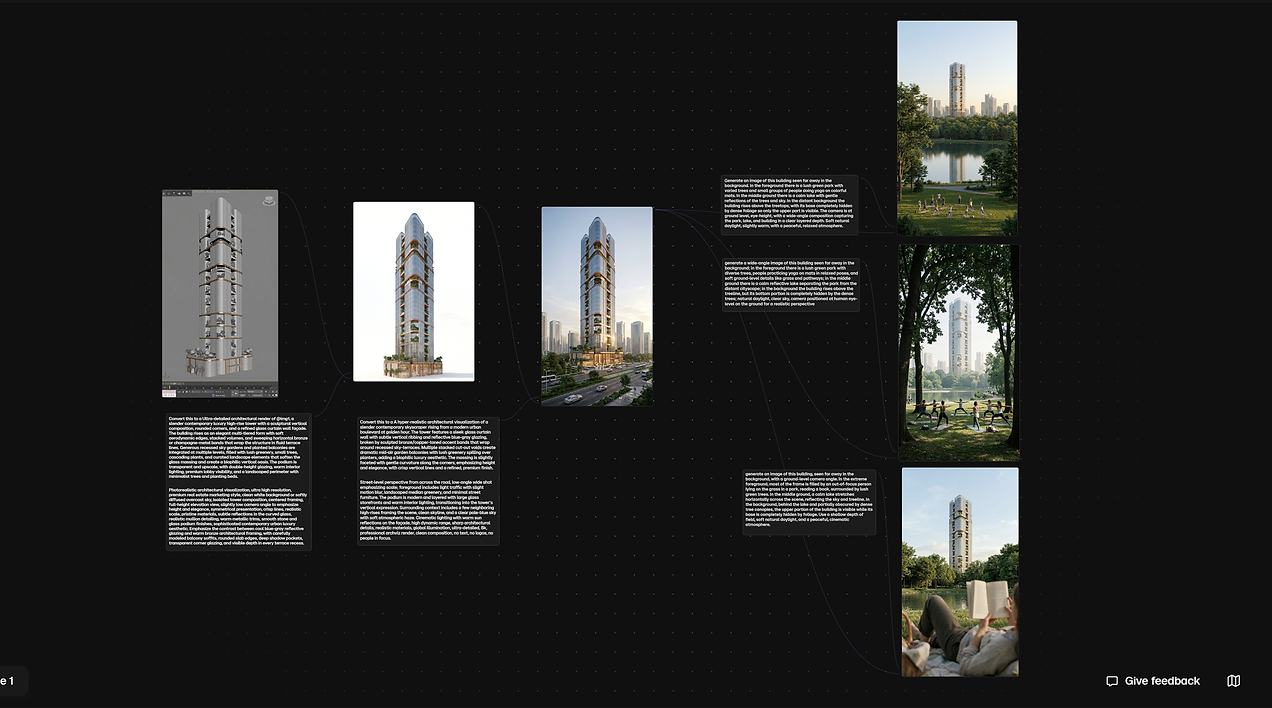
What you see here is just a glimpse of the final result. The full masterclass is a comprehensive, step-by-step recorded video course. You will watch over my shoulder as we cover the exact production pipeline I use as for high-end Dubai and UAE real estate projects—from locking in the initial 3ds Max white model to the final cinematic Image.

Serene Tower
— WHO THIS IS FOR
VISUALIZERS
Future-proof your pipeline. Integrate cutting-edge AI into your existing workflow to produce top-tier, luxury-market renders in a fraction of the time.
ARCHITECTS
Stop waiting on renders. Transform your structural concepts into cinematic, pitch-winning visuals in record time.
REAL ESTATE
Sell the dream before it is built. Generate high-end, cinematic marketing visuals that captivate buyers and elevate your off-plan property listings.
INTERIOR DESIGNERS
Sell the mood, not just the floorplan. Rapidly iterate lighting and materials to give clients a true feel of the space.

— PRICING
Simple.
straightforward.
One workflow. One price. Everything included. No upsells, no subscriptions — just the complete documented process, yours to keep.
EARLY ACCESS
$49
Full price when the workflow goes live publicly.
-
Complete 9-step workflow documentation
-
All prompts and settings included
-
Before & after at every stage
-
Lifetime access
AT LAUNCH
$79
Full price when the workflow goes live publicly.
-
Complete 9-step workflow documentation
-
All prompts and settings included
-
Before & after at every stage
-
Lifetime access
— WHAT YOU WALK AWAY WITH
This is the complete workflow of "Serene Tower" — a realistic exterior architectural project, documented from the very first step to the final cinematic render and cinematic movie using advanced AI tools. Every decision, every prompt, every adjustment. Nothing skipped, nothing simplified.

— FULL WORKFLOW BREAKDOWN
The Complete Workflow of "Serene Tower"
01 —
Your Workspace: Introduction to the Workspace
A single dedicated space where your entire project lives — prompts, references, generated images, edits and video generation, all organised and accessible in one place. No scrolling endlessly to find what you created before. Everything related to your project is right there, from the first reference image to the final cinematic render.
03 —
Materials & Design: Lock PBR Materialized Render
Converting the basic screenshot or render into a fully PBR materialized render on a plain background. This is where the design and materials are confirmed and locked — so every decision about what the building looks like is made here, before the AI workflow begins.
05 —
The Prompt Workflow: Converting References into Detailed Prompts
Using a specific prompt workflow to convert your references and storyboard into highly detailed, structured prompts. This is the core skill — the method that turns a visual idea into language the AI can execute with precision and consistency.
07 —
Refinement Refining & Reediting for Accuracy
Refining and reediting the image through adjusted prompting to get the perfect and accurate result. The iterative process is what separates a good render from a great one — this step is where that precision happens.
09 —
Final Polish Enhancing & Post-Processing
The final layer. Enhancing the render and applying post-processing to bring the image to its highest quality — colour, contrast, sharpness and the subtle finishing touches that make it look like it was shot, not generated.
02 —
Foundation: White Model Render & Scene Setup
From SketchUp, 3ds Max or Revit — producing a basic screenshot or white model render with or without materials. This is your structural foundation. Getting this right is what gives the AI something precise and architectural to work with.
04 —
Story & References: Reference Collection & Storyboard
Analysing the location, studying the property, and building a storyboard. Selecting references for environment, lighting, mood and atmosphere. This is where the project gets a visual direction — not just a render, but a directed scene with intention behind every element.
06 —
Generation Applying the Prompt & Creating the Image
Taking the prompt and applying it to your base image — generating a new render with full realism, specific lighting, accurate environment and precise materials. This is where the foundation work pays off.
08 —
Cinematic Frames Cinematic Renders & Client-Ready
Views Creating cinematic renders, exploring different views, and playing with prompts to get the lighting drama, depth and realistic effects that make clients react. This is about finding the frames that don't just show the building — they make people feel something.
10 —
Cinematic Video: From Renders to Architectural Film
Taking the cinematic frames you created and bringing them to life through video generation. Using specific prompts to produce beautiful, flowing sequences — transforming still renders into a full architectural film. The kind of visual that doesn't just show a building, it tells the story of it.
Img: Serene Tower


— MEET YOUR INSTRUCTOR
Jaseem kp
Jaseem kp
3D Design Manager &
CGI Artist
With years of experience directing and executing architectural visualization for premium projects across Dubai and the UAE, my focus has always been on achieving cinematic realism. Throughout my career—from Senior 3D Visualizer to Design Manager—I’ve delivered high-end commercial and residential visuals for top-tier firms, learning exactly what high-paying clients want to see.